Red Alert
A comprehensive mobile application for instant alerts, communication and crisis coordination for schools, hospitals and other organisations
Pricing
For pricing information please contact us at info@cyberdev.cz
Main App Modules
Alarm
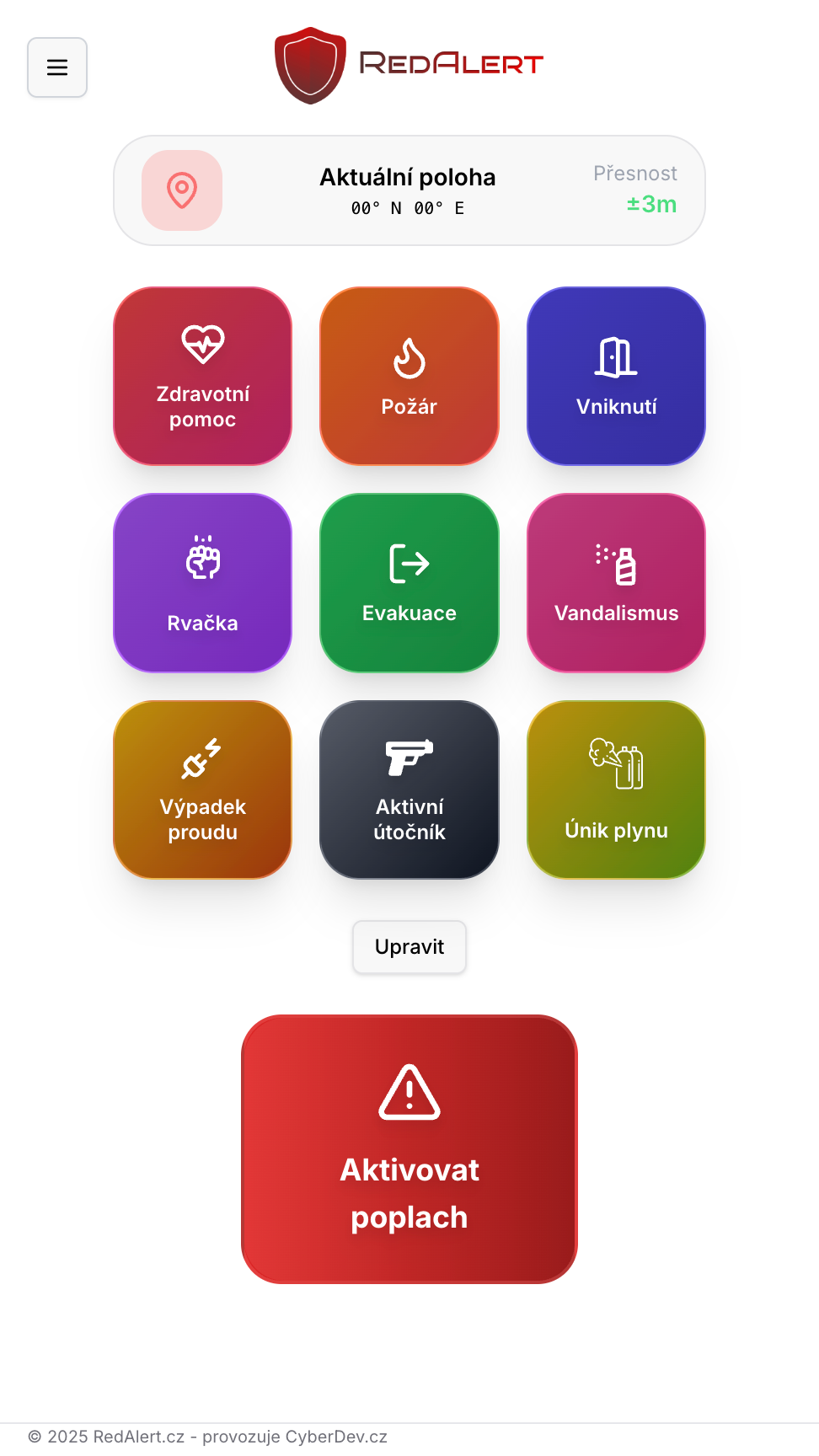
Home screen for immediately triggering an alarm. GPS location sharing and map opening. Each organisation can edit their alarm types as needed.
Chat
Communication within the organisation with other members. Sending messages, emojis and sharing photos. Overview of individual alarms, including who triggered them and where.
Emergency Contacts
Phone numbers for people in the organisation and emergency services. Option to generate an SMS or call emergency services directly.
Documents
Upload of sensitive organisational information such as security plans and evacuation plans, shared with all organisation members.
Monitoring (IZS)
Module for emergency services – monitoring alarms in the organisation, information on who triggered the alarm, phone number, location, time and date.
Settings
Change password, choose language (CZ/EN), demo mode, user and device registration and management, notification management, Viewer permission for students, content management.
How does Red Alert work?
Open the app
Go to redalert.cz in your browser or download the native app from Google Play (Android) or App Store (iOS).
Register your organisation
Register your organisation or log in using a code from your administrator.
Activate an alarm
In case of danger, trigger an alarm with automatic GPS location sharing.
Immediate response
All organisation members and emergency services are instantly notified.
Detailed Feature Description
🚨 Alarm
The app's home screen is used to quickly trigger an alarm in the event of an emergency.
- Each organisation can edit alarm types to suit their needs
- Automatic GPS location sharing when the alarm is triggered
- Option to open current location in maps
- Instant push notifications to all organisation members
💬 Chat
Communication platform for coordination and information sharing within the organisation.
- Real-time communication with other organisation members
- Photo sharing directly in the chat
- Overview of individual alarms – who triggered them and where
- Communication history for documentation purposes
📞 Emergency Contacts
Quick access to important contacts in the organisation and emergency services.
- Phone numbers for key people in the organisation
- Contacts for emergency services (police, fire brigade, ambulance)
- Option to generate an SMS message
- Direct one-click calls to emergency services
📄 Documents
Centralised repository for important security documents.
- Upload security plans
- Evacuation plans and procedures
- Share documents with all organisation members
- Secure access to sensitive information
- Always up-to-date documentation available to all
📡 Monitoring (IZS)
Specialised module for emergency services with a detailed alarm overview.
- Real-time monitoring of all alarms in the organisation
- Information about the person who triggered the alarm
- Phone number of the contact person
- Exact GPS location of the alarm
- Alarm timestamp and date
- Option to coordinate the response
⚙️ Settings
Comprehensive app, user and permissions management.
- Security: Change password and secure account
- Languages: Choose between Czech and English
- Demo mode: Try the app without a real alarm
- User registration: Add new members to the organisation
- User management: Edit and delete user accounts
- Device registration: Add mobile devices
- Device management: Manage registered devices
- Notification management: Configure alerts and alarms
- Viewer permission: Special role for students – access to information without the ability to trigger alarms
- Content management: Delete chat messages and notifications
Benefits for Different Types of Organisations
🏫 For Schools
- • Instant alert during an active shooter situation
- • Viewer permission for students
- • Evacuation plans always at hand
- • Communication with teachers and management
- • Direct connection to emergency services
🏥 For Hospitals
- • Rapid response to medical incidents
- • Staff coordination in crisis situations
- • Security protocols always accessible
- • Chat for quick communication between departments
- • Monitoring for security personnel
🏢 For Companies
- • Employee safety comes first
- • Custom alarm types (fire, evacuation, etc.)
- • Sharing security protocols
- • Permission management for different levels
- • Demo mode for staff training
How to Start Using Red Alert
🌐 PWA Application
Go to redalert.cz in your mobile browser and add the app to your home screen for the best experience.
Works on all modern mobile devices
📱 Android App
The native Android app is available on the Google Play Store for even better performance and integration.
Naskenujte pro stažení z Google Play
Android aplikace
🍎 iOS App
The native iOS app is now available on the App Store, offering the same performance and features as the Android version.
🌍 Language Versions
The app is available in Czech 🇨🇿 and English 🇬🇧.
You can change the language directly in the app settings.
Frequently Asked Questions
Who is Red Alert designed for?+
Red Alert is designed for schools, hospitals, municipal offices, businesses and public spaces – anywhere you need to quickly alert and coordinate a response to a crisis such as an attack, fire or other emergency.
What devices does Red Alert work on?+
The app is available for Windows and macOS (Apple Silicon), as a native app for Android and iOS, and as a PWA directly in the browser at redalert.cz.
How do I get access to the app?+
Contact your organisation's administrator. If your organisation is not yet registered, you can register it directly from the app.
What languages is the app available in?+
The app is fully localised in Czech and English. You can easily change the language in the app settings.
What is the Viewer permission?+
Viewer is a special permission, e.g. for school students, who have access to the app and are informed in case of danger, but cannot trigger alarms themselves.
Can we customise alarm types?+
Yes, each organisation can edit its alarm types according to its specific needs and situations that may arise.
How does IZS monitoring work?+
The Monitoring module provides emergency services with a complete overview of alarms – who triggered the alarm, phone number, exact GPS location and timestamps.
What is demo mode?+
Demo mode lets you try the app and all its features without triggering a real alarm. Ideal for training and getting familiar with the app.
How much does Red Alert cost?+
Downloading the app is free. For deployment in an organisation, we offer complete implementation, configuration and staff training – we will prepare a price tailored to the size and needs of your organisation.
How do we deploy Red Alert in our organisation?+
We handle the complete deployment – configuration, staff training and integration with the municipal police or the organisation's internal structure. Just contact us and we will propose a tailored solution.
Interested in Red Alert for your organisation?
Contact us for more information about implementing Red Alert in your school, hospital or company.
Red Alert is already used by cities and schools across the Czech Republic. View our references.